A shared family calendar the whole house can read
One color-coded week for everyone, on the phone in your pocket and the tablet on the counter.
A color for every family member
Add each person in your family as a parent or a child and give them one of eight colors. Every event, chore and routine shows who it belongs to, so a look at the week tells you who needs to be where.
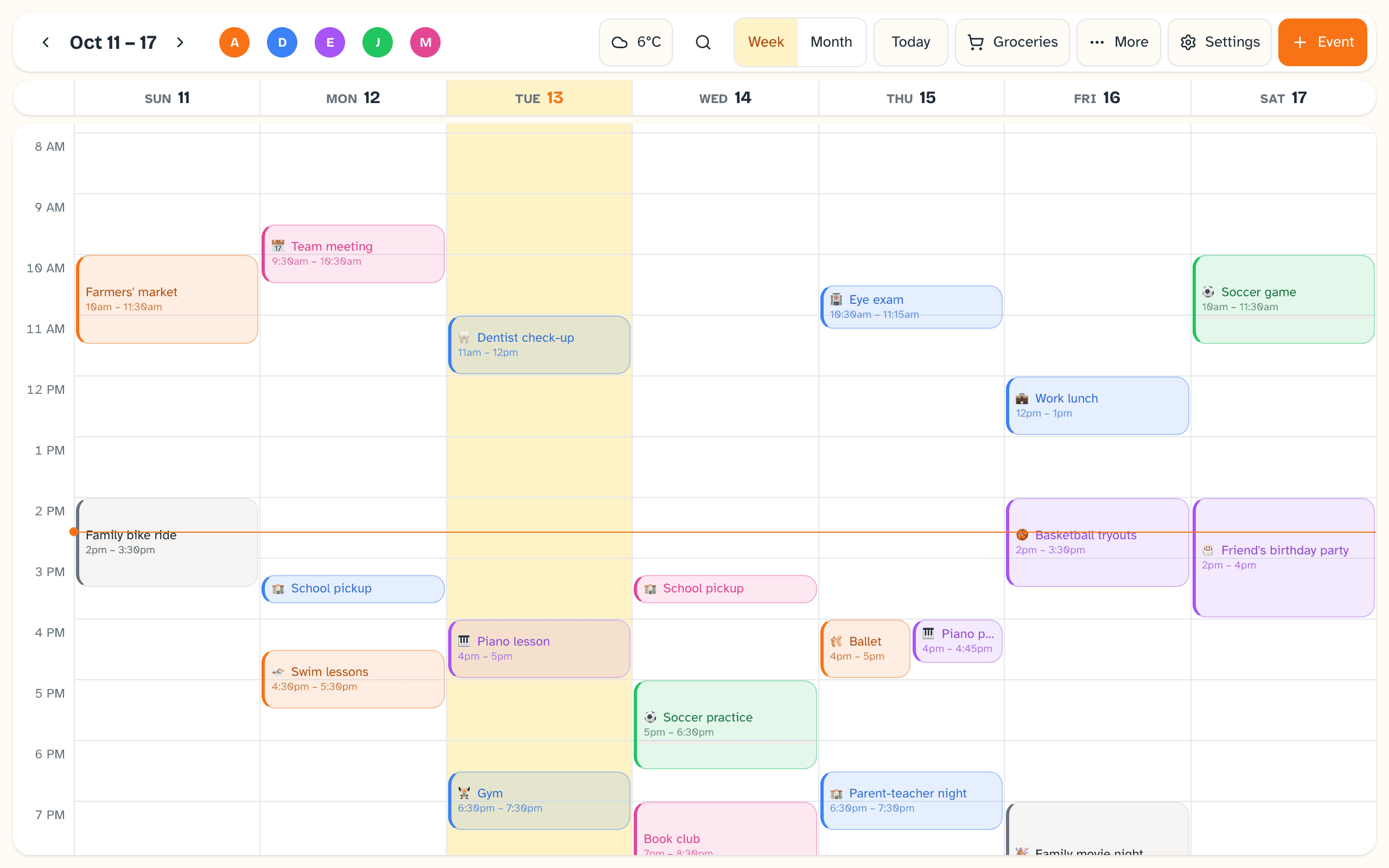
Week view on a tablet, agenda on a phone
On a wide screen Daybreak shows the week as a grid with a timed schedule. On a narrow screen it shows the same week as an agenda list. It picks by screen width, or you can force either one in Settings.
- Rows for all-day events, birthdays, meals, the schedule, chores and routines, each of which you can hide
- Swipe, or use the arrow keys, to move a week at a time
- Weeks run Sunday to Saturday
- Times in a 12-hour or 24-hour clock, chosen once in Settings for the whole family
A month overview, and search
A Week and Month switch sits at the top of the calendar. Month is an overview of six weeks: each day shows up to three event titles in their owners' colors, or colored dots on a narrow screen, with a “+2 more” style count when a day holds more. Tap a day and Daybreak opens that week. The search button beside the switch finds events by title, from about a month back to a year ahead, and choosing a result opens its week.
Repeating events for practice, lessons and pickups
An event can happen once or repeat: daily, on weekdays, on weekends, on the days of the week you pick, or monthly. Give a repeating event an end date, or leave it open. Any event can carry notes. All-day events sit in their own row, and so do birthdays, which show the age someone is turning when you've entered their birth year.
Import your Google Calendar
Connect a Google calendar from Settings and its events appear alongside the ones you add in Daybreak. Daybreak asks Google for read-only access. You can assign a connected calendar's events to a family member, hide a connected calendar from view with one tap, and remove the connection whenever you like. You can also keep everything in Daybreak and connect nothing.
Weather and on-screen reminders
Set your location once and the calendar shows current conditions and a multi-day forecast. Reminders are off until you turn them on in Settings. Once on, a full-screen reminder appears ahead of an event on every device that has Daybreak open, with buttons to snooze for five minutes or dismiss.
- Choose a default warning of 5, 10, 15 or 30 minutes, or 1 hour
- Set a different reminder, or none, on any single event
- An optional chime plays when a reminder appears
Being straight with you
What it doesn't do yet
- The month view is an overview of events. It doesn't show meals, chores or routines, and nothing is edited there: tapping a day opens its week.
- Search looks at event titles only, and it needs a connection. It doesn't work offline.
- Daybreak does not send push notifications to your phone yet. Reminders appear on screens that have Daybreak open.
- Google Calendar import is one-way. Events from Google are edited in Google, and events you add in Daybreak are not written back to your Google calendar.
- Apple Calendar (CalDAV) support is in progress.
- A family shares one sign-in. Other adults and other devices join with a pairing code instead of their own login.
Tomorrow morning can start like this.
Daybreak is live. Set it up tonight on the devices you already own — the whole family wakes up on the same page.
No credit card to start. $9.99 CAD/month after your trial — cancel anytime.